Step 1 of 5
Receive your school login
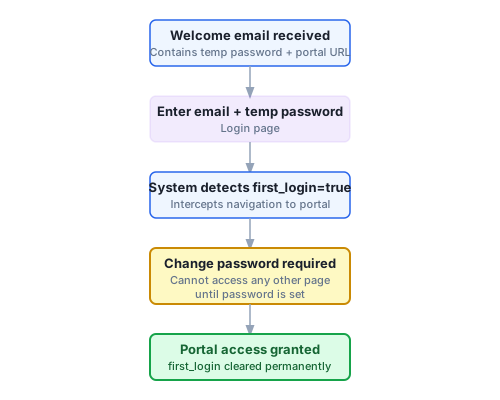
Your School Admin creates your account and emails you a temporary password. You set a permanent password on your first login — no admin involvement needed after that.
You don't sign up for StudyBuddy — your school does. Here's how your account reaches you:
- Your School Admin provisions your account and the system sends you a welcome email with a temporary password.
- Open the link in the email and enter your school email address and the temporary password.
- You are immediately taken to a Change Password screen. Enter a new permanent password (at least 12 characters) and confirm it.
- Click Save password — you land on the student dashboard and your content is ready.
You cannot skip the Change Password screen. All portal pages redirect back to it until it is complete. If you later forget your password, the Forgot password link on the login page sends a reset link to your school email — no need to contact anyone.
All steps